
V. Troubleshooting
| Issue No. | Symptom | Troubleshooting Steps |
|---|---|---|
| 1 | No sound / Sound from only one ear | 1. Ensure the earbud plug is fully inserted; clean debris from your device’s audio port. 2. Check for cable/plug damage; test with another device to rule out port issues. 3. Adjust volume on the device/in-line controls and disable mute. |
| 2 | Microphone not working | 1. Clean debris from the microphone port. 2. Test with another device and check device microphone settings. 3. Inspect the cable for damage (contact after-sales if damaged). |
| 3 | Static noise / Muffled audio | 1. Wear the earbuds correctly and replace with a properly sized ear tip. 2. Clean debris from the ear tip mesh and microphone port. 3. Avoid pulling/bending the cable to prevent internal poor contact. |
| 4 | Static electricity in dry environments | 1. Avoid prolonged use in extremely dry conditions. 2. Touch a grounded metal surface with the earbuds to discharge static before use. |
Quick Fixes to Try First
- 1Check whether the app and the firmware are on the latest version. If not, update first.
- 2Unplug the earbuds and plug them back in.
- 3Restart the Dubbing AI app.
- 4Restart your phone.
- 5On some Android phones, OTG permission must be enabled to use Mobile Mode — otherwise the earbuds will not be recognized.
No Sidetone / Blank Voice Message / Voice Not Changing
First confirm whether you are in Mobile Mode or Console & VR Mode.
- Mobile Mode: check the app permissions, then work through the quick fixes above (re-plug, restart the app, restart the phone).
- Console & VR Mode: check that the earbuds are connected properly first (see below).
How to Test the Connection in Console & VR Mode
With the earbuds connected, tap the three dots in the top-right corner of the earbuds mode page, then tap Test Connection. In the dialog, tap Sample and check whether you can hear the prompt audio “Connected in Console & VR Mode”.
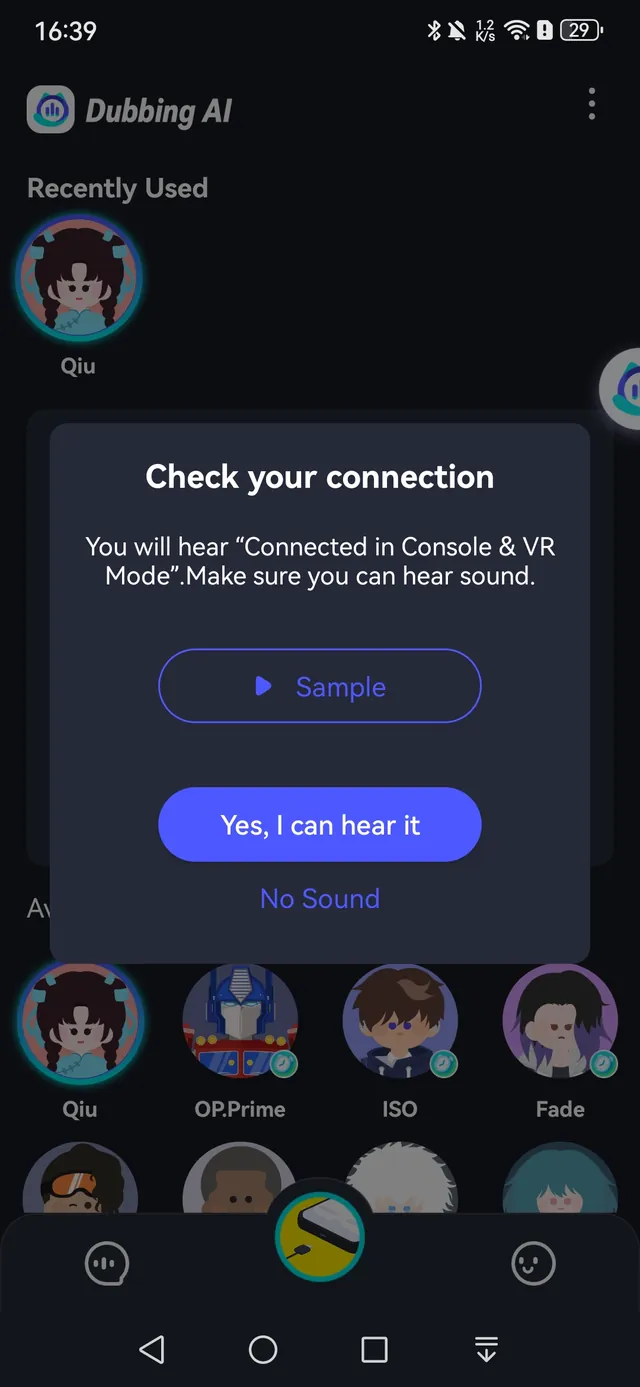
Note: Test Connection is only available when the firmware meets the version requirement — 5-wire earbuds (SN starting with D0) require v0.0.4 or later, and 6-wire earbuds (SN starting with D2) require v0.0.7 or later.