
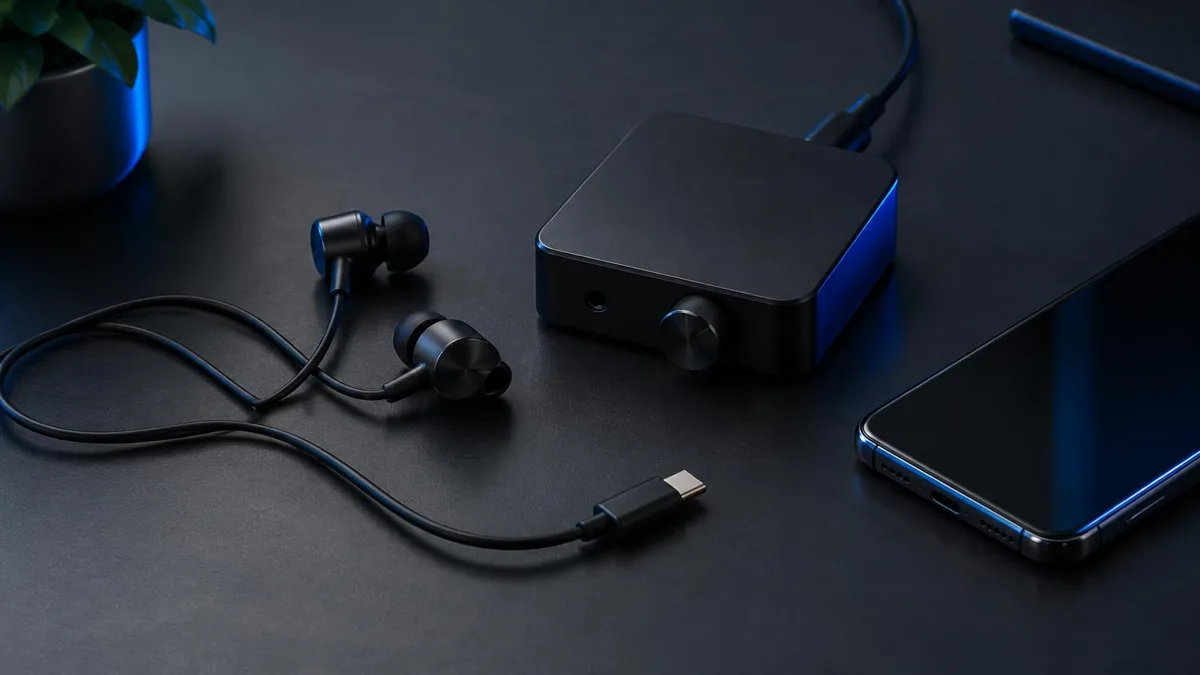
Dubbing AI makes two pieces of hardware for real-time voice changing, and they solve the same problem in different ways. One is a pair of wired earbuds that plugs straight into your phone. The other is a small box that sits between your phone and a Bluetooth headset you already own.
Both give you live voice conversion without a PC or an external sound card. The right pick depends on three things: which phone you use, whether you already love a headset, and where you plan to talk. This guide walks through each one so you can decide in a few minutes.
The short answer: who each setup is built for
- Dubbing AI Earbuds — for anyone who wants one plug-in kit that works on Android and iPhone, with no headset to pair and nothing else to buy.
- Dubbing Box — for Android-friendly users who already own a Bluetooth headset they like and want to keep using it while voice changing.
If you are still unsure after that, the rest of this article breaks down the differences that matter in daily use: how sound moves through each device, what you need on day one, and how each handles longer sessions.
How each device connects and processes your voice
Dubbing AI Earbuds: wired USB-C, processing on the phone
The Earbuds use a wired USB-C audio connection and have no internal battery, so there is nothing to charge. The voice model runs inside the Dubbing AI app on your phone. Your processed voice is sent to the earbuds and returned to the phone through USB-C microphone input, which is what other apps hear.
That design has two practical consequences. The app must stay running during use, and the phone must stay online the whole time. In return you get a single cable, no pairing, and the same behaviour on supported iPhone and Android models. The full spec sheet lives on the Dubbing AI Earbuds product page.
Dubbing Box: one cable, one box, your own headset
The Dubbing Box is built around a Bluetooth headset. You must pair it with Bluetooth headphones to use it, and the initial setup has to be completed on an Android device. After that, it runs as a one-cable, one-box setup without a PC or an external sound card.
Earbuds bring the headset with them. The Box lets you bring your own.
Earbuds vs Box, side by side
| Feature | Dubbing AI Earbuds | Dubbing Box |
|---|---|---|
| Connection to phone | Wired USB-C audio | One cable to the box |
| Headset | Included (the earbuds themselves) | Bluetooth headset required, not included |
| Phone for setup | Android or iPhone | Android device required for setup |
| Battery to charge | None | Depends on your Bluetooth headset |
| Latency (as of Oct 2026) | Around 300 ms | Around 300 ms |
| Voice library (as of Oct 2026) | 500+ voices | 500+ voices |
| Needs PC or sound card | No | No |
| Console use | Console Mode in the app | See the Dubbing Box page for current status |
| Best for | Grab-and-go mobile calls and gaming | Users attached to their own headset |
The core voice engine is the same, so voice quality and delay feel alike. What differs is everything around it: what you plug in, what you pair, and which phone you can use for setup.
One cable, no pairing, works on iPhone and Android
Dubbing AI Earbuds: real-time voice changing with around 300 ms latency and 500+ voices, powered by the Dubbing AI app on your phone.
Buy Dubbing EarbudsPick the Earbuds if you want the simplest mobile kit
- You use an iPhone 15, 16, 17 or 18 series model, iPhone Duo, or a Type-C Android phone that supports USB-C audio input.
- You do not own a Bluetooth headset, or you do not want to depend on one.
- You want zero charging: the earbuds draw nothing from a battery of their own.
- You mainly change your voice in mobile games, voice chat apps and phone calls.
- You want the option to move to a console later with Console Mode.
A typical example: you play Free Fire or CoD Mobile on an iPhone during your commute. Plug the earbuds in, open the app with mobile data on, pick a voice, and you are ready. There is no pairing step that can drop out halfway through a match.
Pick the Dubbing Box if you love your current headset
- You already own Bluetooth headphones with a fit or sound you do not want to give up.
- You have an Android device available to complete the initial setup.
- You prefer over-ear comfort for long sessions over in-ear buds.
- You like a dedicated box you can leave set up on your desk.
A typical example: you stream from an Android phone for two hours at a time with an over-ear Bluetooth headset. The Box lets you keep that comfort while adding real-time voice conversion. You can read more about this approach on the Dubbing Box product page.
Console, VR and multi-device use
If you want to use your changed voice on a console, the Earbuds have a Console Mode (Console & VR Mode) inside the Dubbing AI app. The phone still does the processing, so it stays connected and online throughout. Setup follows a fixed order:
- 1Plug the USB-C earbuds into your phone and open Dubbing AI with internet access.
- 2Select Console Mode (Console & VR Mode) on the earbuds page in the app.
- 3Complete the connection in the app before disconnecting the earbuds from the phone.
- 4Unplug the earbuds from the phone and connect them to the console using the supported connection for that platform.
- 5Keep Dubbing AI running and the phone online throughout voice changing. Check the console's active microphone input and ask a listener to confirm the outgoing voice.
For the Box, check the product page for its current platform status before you buy for console use. If you mostly want to avoid a computer altogether, our guide to using a real-time voice changer without a PC covers both devices in phone-first setups.
A 60-second decision checklist
- 1Do you use an iPhone and have no Android device for setup? Choose the Earbuds.
- 2Do you own a Bluetooth headset you want to keep using? Lean toward the Box.
- 3Do you want nothing to charge and nothing to pair? Choose the Earbuds.
- 4Do you plan to use your voice on a console through the app's Console Mode? Choose the Earbuds.
- 5Still tied? Pick based on comfort: in-ear buds or your own over-ear headset.
Neither device is the better one in general. They share the same voice engine and the same delay, and they differ in what you bring to the setup. Match the hardware to the gear and phone you already have, and either choice will serve you well.
Keep the headphones you already own
The Dubbing Box pairs with your Bluetooth headset for real-time voice changing. Initial setup is completed on an Android device.
Buy Dubbing BoxFrequently asked questions
Dubbing AI Team
Hardware & Voice AI